

Cyberlearnix Pvt Ltd
Skip course categories
Course categories
Skip available courses
Available courses
A "Modern AI Fundamentals" course provides a comprehensive introduction to the rapidly evolving field of Artificial Intelligence, focusing on the core concepts, techniques, and applications that define contemporary AI. Unlike older "AI Fundamentals" courses that might have emphasized symbolic AI more heavily, modern courses prioritize machine learning, deep learning, and current practical applications.
Here's a typical summary of what a "Modern AI Fundamentals" course would cover:
1. Introduction to Artificial Intelligence (AI):
- What is AI? Defining AI, its history, different approaches (symbolic vs. connectionist), and its current state.
- Goals and Applications of AI: Exploring the broad impact of AI across various industries (healthcare, finance, autonomous systems, entertainment, etc.).
- AI Ethics and Responsible AI: Discussing the societal implications, biases, fairness, transparency, and ethical considerations in AI development and deployment.
2. Core Machine Learning Concepts:
- Introduction to Machine Learning (ML): Understanding the paradigm shift from traditional programming to learning from data.
- Types of Machine Learning:
- Supervised Learning: Regression (predicting continuous values) and Classification (predicting discrete categories).
- Common algorithms: Linear Regression, Logistic Regression, Decision Trees, Support Vector Machines (SVMs), k-Nearest Neighbors (k-NN).
- Unsupervised Learning: Clustering (grouping similar data points) and Dimensionality Reduction (reducing features).
- Common algorithms: K-Means, Hierarchical Clustering, Principal Component Analysis (PCA).
- Reinforcement Learning (RL): Learning through trial and error, interaction with an environment, and reward signals. (Often a high-level overview or basic concepts).
- Supervised Learning: Regression (predicting continuous values) and Classification (predicting discrete categories).
- Data Preprocessing and Feature Engineering: Techniques for cleaning, transforming, and preparing data for ML models.
- Model Evaluation and Validation: Metrics for assessing model performance (accuracy, precision, recall, F1-score, RMSE), overfitting, underfitting, cross-validation.
3. Deep Learning Fundamentals:
- Introduction to Neural Networks: Understanding the basic building blocks (neurons, layers, activation functions) and how they learn.
- Deep Learning Architectures:
- Feedforward Neural Networks (MLPs): Basic multi-layered networks.
- Convolutional Neural Networks (CNNs): Primarily used for image processing and computer vision tasks.
- Recurrent Neural Networks (RNNs): Used for sequential data like text and time series. (Often includes LSTMs/GRUs).
- Transformers: Introduction to the attention mechanism and the architecture that revolutionized NLP.
- Training Deep Learning Models: Backpropagation, optimization algorithms (Gradient Descent, Adam), loss functions.
- Introduction to Deep Learning Frameworks: Brief overview of popular frameworks like TensorFlow and PyTorch (may involve simple code examples).
4. Natural Language Processing (NLP) Basics:
- Text Representation: Word embeddings (Word2Vec, GloVe), tokenization.
- Basic NLP Tasks: Sentiment analysis, text classification, named entity recognition.
- Large Language Models (LLMs): Introduction to their concepts, capabilities (generative text, summarization, translation), and the paradigm of prompt engineering. (Often includes hands-on with tools like ChatGPT or Gemini).
5. Computer Vision (CV) Basics:
- Image Representation: How computers "see" images.
- Basic CV Tasks: Image classification, object detection, image segmentation.
- Applications of CNNs in CV.
6. Practical Aspects and Tools (often integrated throughout):
- Programming Languages: Python is almost universally used for AI.
- Libraries: NumPy, Pandas, Scikit-learn, Matplotlib, Seaborn.
- Cloud Platforms: Brief mention of AI services on AWS, Azure, or Google Cloud (depending on the course focus).
- Version Control (Git/GitHub): Basic understanding for collaborative projects.
Overall Goal: The aim of a "Modern AI Fundamentals" course is to demystify AI, provide a conceptual understanding of its core components, and equip students with the foundational knowledge and practical skills necessary to understand, apply, and engage with contemporary AI technologies and trends. It serves as a stepping stone for more specialized AI fields like machine learning engineering, deep learning research, or data science.
- Teacher: Cyberlearnix Admin
- Teacher: Sridhar Uduthala

- Teacher: Cyberlearnix Admin


A "Fundamentals of Linux" course provides a comprehensive introduction to the Linux operating system, focusing on its core concepts, command-line interface, and essential functionalities. This type of course is crucial for aspiring IT professionals, developers, system administrators, and anyone who wants to gain proficiency in the Linux environment.
Here's a typical summary of what a "Fundamentals of Linux" course would cover:
1. Introduction to Linux:
- What is Linux? Definition, open-source nature, and its role in various computing environments (servers, desktops, embedded systems).
- History and Evolution: A brief overview of Unix and the development of Linux.
- Linux Distributions: Understanding popular distributions (Ubuntu, Fedora, CentOS/RHEL, Debian, Kali Linux, etc.) and their use cases.
- Licensing Model: Introduction to GNU General Public License (GPL) and the philosophy of free and open-source software.
- Linux Architecture: High-level understanding of the kernel, shell, file system, and user space.
2. Getting Started with the Linux Command Line (CLI):
- Accessing the Terminal/Shell: How to open and interact with the command line.
- Basic Commands:
ls: Listing files and directories.cd: Changing directories.pwd: Printing the working directory.mkdir,rmdir: Creating and removing directories.touch,cp,mv,rm: Creating, copying, moving, and deleting files.cat,more,less,head,tail: Viewing file contents.
- Command Syntax: Understanding command structure, options/flags, and arguments.
- Getting Help: Using
manpages andhelpcommands for documentation. - Tab Completion: Efficiently completing commands and file paths.
3. Linux File System:
- File System Hierarchy Standard (FHS): Understanding the standard directory structure (e.g.,
/,/home,/etc,/var,/usr,/bin,/sbin). - Absolute and Relative Paths: Navigating the file system using different path types.
- File Types: Regular files, directories, symbolic links, hard links.
- File Permissions: Understanding ownership (user, group, others) and permissions (read, write, execute), and using
chmod,chown,chgrpto manage them.
4. Text Editors:
- Introduction to Command-Line Editors: Focusing on widely used editors like
NanoandVim(orVi). - Basic Editing Operations: Creating, saving, opening, and modifying text files.
5. Input/Output Redirection and Pipes:
- Standard Input, Output, and Error: Understanding the default streams.
- Redirection Operators:
>(redirect output),>>(append output),<(redirect input),2>(redirect error). - Pipes (
|): Chaining commands together to send the output of one command as the input to another. - Filters: Using commands like
grep,sort,uniq,cut,awk,sedto process text.
6. User and Group Management:
- User Accounts: Creating, modifying, and deleting user accounts (
useradd,usermod,userdel). - Group Management: Creating, modifying, and deleting groups (
groupadd,groupmod,groupdel). - Password Management: Setting and changing user passwords (
passwd). sudoCommand: Understanding elevated privileges and usingsudofor administrative tasks.
7. Process Management:
- Understanding Processes: What is a process, process IDs (PIDs).
- Monitoring Processes: Using
ps,top,htopto view running processes. - Controlling Processes: Sending signals (
kill,killall) to terminate or manage processes. - Background and Foreground Processes: Running commands in the background.
- Job Control: Managing multiple jobs in the shell.
8. Package Management:
- Introduction to Package Managers: Understanding their role in installing, updating, and removing software.
- Common Package Managers:
- Debian/Ubuntu-based:
apt(orapt-get,dpkg). - Red Hat/CentOS/Fedora-based:
yum(ordnf,rpm).
- Debian/Ubuntu-based:
- Installing, Updating, and Removing Software Packages.
9. Basic Networking:
- Network Configuration: Checking IP addresses (
ip addr,ifconfig). - Basic Network Utilities:
ping,traceroute,ssh(Secure Shell) for remote access. - Firewall Basics: Introduction to
ufworfirewalldfor basic firewall configuration.
10. Archiving and Compression:
tar: Archiving files and directories.gzip,bzip2,zip: Compressing and decompressing files.
11. Basic Shell Scripting (Introduction):
- What is a Shell Script? Automating repetitive tasks.
- Creating and Executing Simple Scripts: Basic syntax,
shebangline (#!/bin/bash). - Variables: Using variables in scripts.
- Basic Control Flow: Introduction to
ifstatements and loops (for,while).
Overall Goal: The primary objective of a "Fundamentals of Linux" course is to provide hands-on experience and build confidence in using the Linux command line effectively, which is a critical skill for various roles in the IT industry.
- Teacher: Cyberlearnix Admin
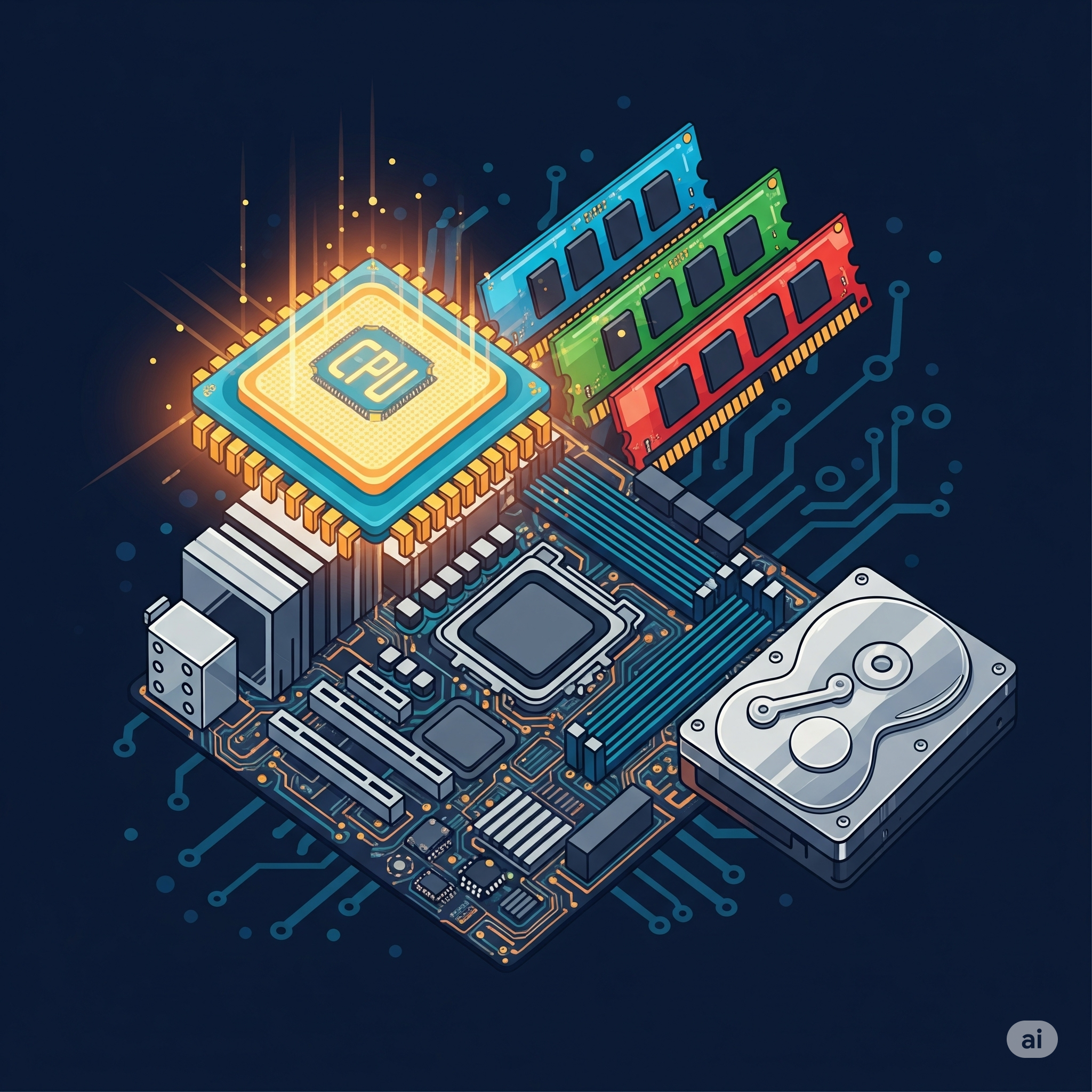
Introduction to Computer Hardware 🖥️⚙️
Unlock the secrets inside your computer! This foundational course provides a comprehensive overview of computer hardware components and how they work together. You'll journey from the central processing unit (CPU) and memory (RAM) to storage devices (HDDs/SSDs), motherboards, power supplies, and input/output (I/O) peripherals.
Learn to identify different components, understand their functions, and grasp how they interact to bring a computer to life. We'll also cover basic troubleshooting concepts and discuss considerations for upgrading and maintaining hardware.
Perfect for beginners, aspiring IT professionals, or anyone curious about what makes computers tick! By the end of this course, you'll have a solid understanding of computer architecture and the confidence to talk about hardware like a pro.
What you'll learn:
- The role and function of major hardware components.
- How data flows and is processed within a computer system.
- Common types of ports and connectors.
- Basic hardware troubleshooting techniques.
- An introduction to hardware maintenance and upgrades.
- Teacher: Cyberlearnix Admin
An "Operating System Fundamentals" course provides a foundational understanding of how computer operating systems work and manage hardware and software resources. It's a core subject in computer science and engineering, essential for anyone looking to delve into software development, system administration, or computer architecture.
Here's a typical summary of topics covered:
1. Introduction to Operating Systems:
- Definition and Role: What an OS is, why it's essential (acting as an intermediary between user/applications and hardware).
- Evolution of OS: A brief history of operating systems, from batch processing to modern multi-user, time-sharing, and distributed systems.
- Types of Operating Systems: Exploring different categories like batch, multi-programmed, time-sharing, real-time, distributed, and mobile OS.
- Operating System Structure: Common architectural approaches (monolithic, layered, microkernel, hybrid).
- System Calls and Services: How applications interact with the OS to request services.
2. Process Management:
- Process Concept: Defining a process (a program in execution), its states (new, ready, running, waiting, terminated), and the Process Control Block (PCB).
- Threads and Concurrency: Understanding threads as lighter-weight units of execution within a process, and the benefits of multithreading.
- Process Scheduling: Algorithms and strategies for allocating CPU time to multiple processes (e.g., FCFS, SJF, Round Robin, Priority Scheduling).
- Inter-process Communication (IPC): Mechanisms for processes to communicate and synchronize with each other (e.g., pipes, message queues, shared memory).
- Process Synchronization: Addressing challenges of concurrent access to shared resources, including critical section problems, semaphores, monitors, and classic synchronization problems (e.g., Reader-Writer, Dining Philosophers).
- Deadlocks: Understanding the conditions for deadlock, and strategies for prevention, avoidance (e.g., Banker's Algorithm), detection, and recovery.
3. Memory Management:
- Memory Hierarchy: Understanding different levels of memory (cache, main memory, secondary storage) and their characteristics.
- Memory Allocation: Techniques for allocating memory to processes (e.g., contiguous allocation, paging, segmentation).
- Virtual Memory: Concepts of virtual memory, demand paging, and their benefits for memory utilization and program execution.
- Page Replacement Algorithms: Strategies for deciding which pages to swap out of memory when new ones are needed (e.g., FIFO, LRU, Optimal).
- Thrashing: Understanding and mitigating performance degradation due to excessive paging.
4. Storage Management:
- File System Concepts: How the OS organizes and manages files and directories (logical structure, access methods, protection).
- File System Implementation: Details of how file systems are structured on disk, directory implementation, and allocation methods (contiguous, linked, indexed).
- Disk Management: Managing disk space, disk scheduling algorithms (e.g., FCFS, SSTF, SCAN, C-SCAN), and error handling.
5. I/O Systems:
- I/O Hardware and Software: Understanding different I/O devices and how the OS interacts with them.
- Device Drivers: The role of device drivers in managing I/O operations.
- I/O Buffering and Spooling: Techniques for improving I/O performance.
6. Protection and Security:
- Protection Mechanisms: Controlling access to system resources.
- Security Principles: Safeguarding the system from threats and unauthorized access.
Overall Goal: The course aims to equip students with a solid theoretical foundation in operating system principles, enabling them to understand the underlying mechanisms that make modern computing possible, and to analyze, design, and implement efficient and secure operating systems.
- Teacher: Cyberlearnix Admin


This course provides a comprehensive introduction to the C programming language, a foundational language in computer science. Students will learn the syntax, semantics, and practical application of C for developing efficient and robust software. Topics include basic data types, control structures, functions, arrays, pointers, strings, structures, file I/O, and dynamic memory management.
- Teacher: Cyberlearnix Admin
Skip site announcements